Technical Best Practices for Extracting AWS Logs into Cribl
Purpose
To design a secure, scalable, and cost-optimized pipeline for extracting AWS log telemetry, transforming it into OpenTelemetry (OTLP) format, and routing it through Cribl Stream for delivery to multiple destinations.
Why This Matters
AWS logging services are powerful but often siloed within the AWS ecosystem. By integrating AWS-native log streams into Cribl, enterprises can:
- Correlate AWS telemetry with other cloud, on-premises, and SaaS sources.
- Apply in-stream optimization to reduce ingestion cost and improve analysis speed.
- Enable multi-destination routing without reconfiguring AWS sources.
Proposed Architecture
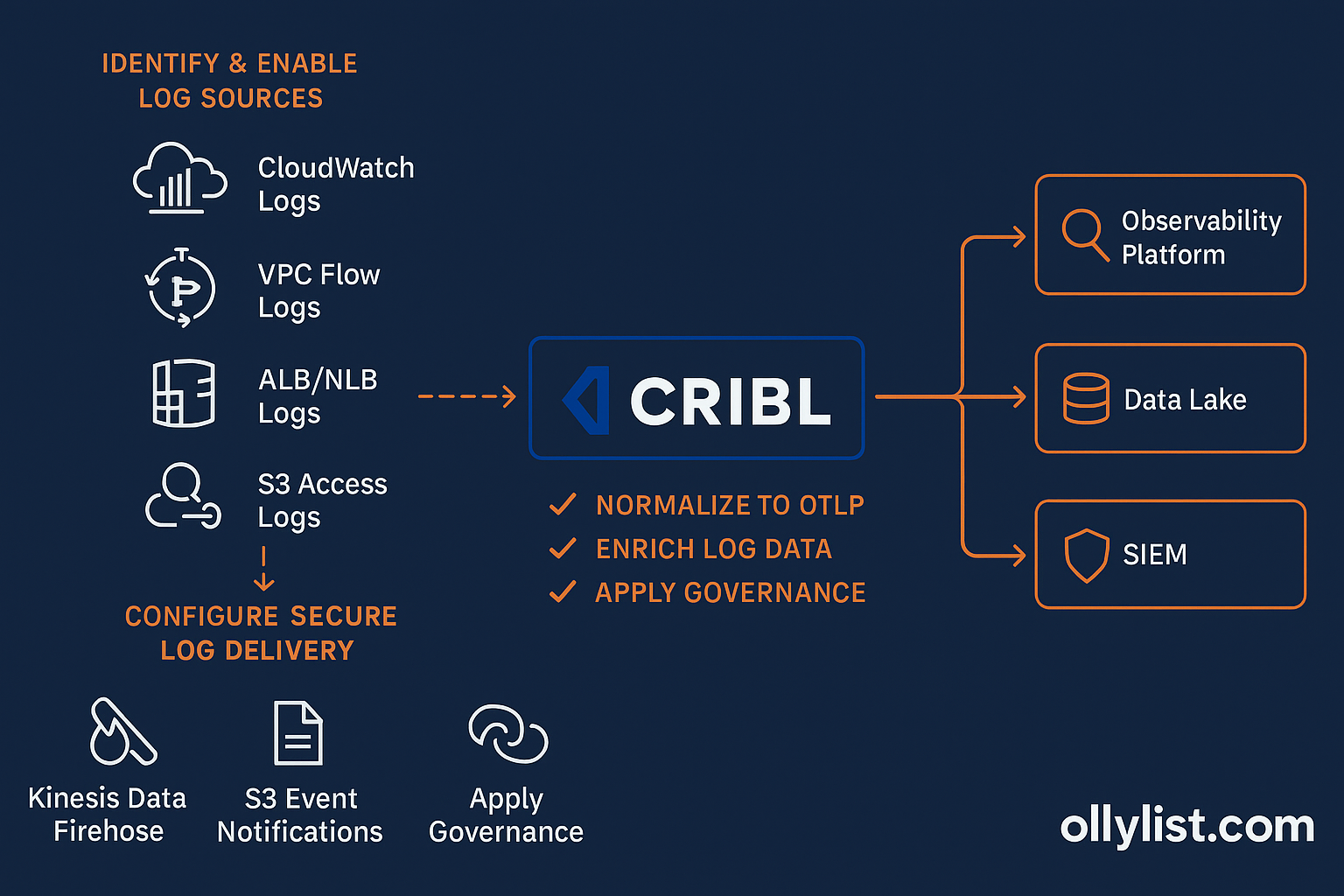
AWS-Side Action Items
1. Identify and Enable Required Log Sources
- CloudWatch Logs: Application logs, Lambda logs, system logs.
- VPC Flow Logs: Network traffic patterns and security monitoring.
- ALB/NLB Logs: Load balancer access logs.
- S3 Access Logs: Object-level activity for compliance and auditing.
- EKS Container Logs: Via CloudWatch Container Insights or Fluent Bit.
2. Configure Secure Log Delivery
- Kinesis Data Firehose → Cribl:
- Create a Kinesis Data Firehose delivery stream.
- Use Cribl’s Kinesis input to consume events.
- Apply IAM roles granting
firehose:PutRecordBatchto source services.
- S3 Event Notifications → Cribl:
- Configure log service to store data in S3.
- Enable event notifications for
s3:ObjectCreated. - Route notifications to an SQS queue or Lambda function that pushes to Cribl.
- Private Connectivity:
- Use AWS PrivateLink or VPC Peering to avoid public internet egress.
- Ensure Cribl workers have private IP reachability into AWS.
3. Apply Pre-Extraction Controls
- Filter unneeded logs at the source (e.g., set VPC Flow Logs to “Reject” traffic only if security-focused).
- Tag log groups for ownership and cost tracking.
- Set retention policies in CloudWatch/S3 to avoid unnecessary storage duplication.
Cribl-Side Action Items
1. Configure Inputs
- Kinesis Input: Point to the AWS delivery stream endpoint.
- S3 Input: Connect to S3 bucket(s) with access keys or IAM role assumption.
- API/Cloud-Native Connectors: Use AWS CloudWatch Logs input when direct API pull is preferred.
2. Normalize to OTLP
- Create pipelines that:
- Parse AWS JSON log structures.
- Map fields to OpenTelemetry conventions (
service.name,cloud.region,http.status_code). - Apply consistent timestamp formats (UTC, RFC3339).
3. Enrich Log Data
- Join against CMDB/asset inventory for system context.
- Append environment metadata (
prod,dev,staging). - Add geolocation data for IP fields where appropriate.
4. Route to Multiple Destinations
- Observability Platform: e.g., Grafana, New Relic for performance metrics.
- Data Lake: e.g., AWS S3, Azure Data Lake for retention and BI analysis.
- SIEM: e.g., Splunk, Sentinel for security analytics.
5. Apply Governance and Cost Controls
- Mask PII using Cribl function
Mask()before sending to destinations. - Sample high-volume logs (e.g., reduce 1:10 for debug-level messages).
- Use Cribl “Routing” to avoid sending identical data to multiple costly destinations unnecessarily.
What to Avoid
- Bypassing Normalization: Raw AWS logs often have inconsistent fields; skip this and you’ll break correlation in downstream tools.
- Using Public Egress: This can create security and compliance issues; always use private connectivity.
- One-to-One Routing: Sending everything to a single analytics platform limits flexibility; use Cribl for fan-out routing.
Key Takeaways
By tightly integrating AWS-native logging services with Cribl Stream:
- You gain multi-cloud observability without sacrificing security.
- You reduce ingestion and storage costs through in-stream optimization.
- You future-proof your pipeline with OTLP standardization.